If your Notion setup feels scattered - goals in one place, habits in another, and tasks everywhere - there’s a better way. Notion Goal and Habit OS templates organize everything into a single, connected system, linking long-term goals to daily habits and tasks. Instead of juggling separate pages, you’ll have one streamlined workspace where every action contributes to your bigger objectives.
This guide breaks down how these templates work, from building goal hierarchies to automating progress tracking. Plus, you’ll discover curated Notion OS dashboards from OS Dashboard HQ that help you skip the setup and start achieving your goals faster. If you're just getting started, a Notion starter templates bundle can provide the perfect foundation. Let’s dive into how you can turn daily actions into long-term success with the right Notion OS.
Goal & Habit Tracker in Notion ⚠️ Free Notion Template
sbb-itb-ced67d6
What a Goal Hierarchy in Notion Looks Like
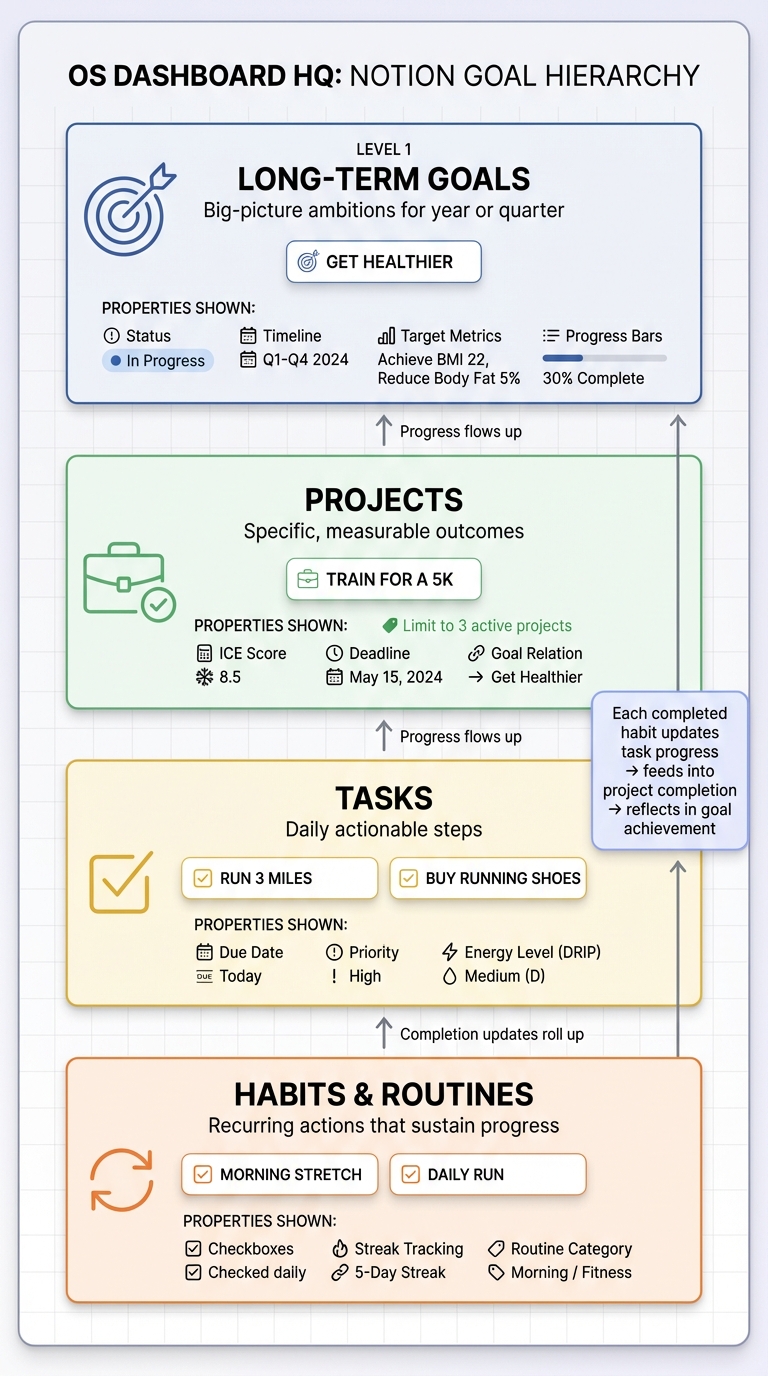
Notion Goal Hierarchy Structure: From Long-Term Goals to Daily Habits
A goal hierarchy in Notion is like a ladder, where each step builds on the one before it. At the top, you set your long-term goals - those big-picture ambitions for the year or quarter. From there, you break them down into projects, which are specific, measurable outcomes (e.g., "complete a 12-week training program"). Projects then branch into tasks, the actionable steps you tackle daily. At the base, habits and routines provide the recurring actions that help sustain progress toward your goals.
For instance, instead of a vague goal like "get healthier", you’d create a database entry for it, link it to a project like "train for a 5K", add tasks to support that project, and incorporate daily habits like stretching or running. With Notion’s relations and rollups, completing a simple habit like a morning stretch updates your project’s progress, which then feeds into your overarching health goal. This setup gives you a clear view of how today’s actions move you closer to your long-term ambitions.
Here’s a closer look at how each layer - goals, projects, tasks, and habits - works together.
Goals, Projects, Tasks, and Habits Defined
Goals are your big-picture objectives. These might be task-based (like earning a certification) or numbers-driven (such as reading 50 books or running 500 miles). In Notion, each goal is a database entry with properties like status, deadlines, and progress bars that pull data from linked projects and tasks.
Projects are the mid-level efforts that bring you closer to your goals. They’re specific and outcome-focused, such as "launch a podcast" or "organize a team retreat." Many templates suggest limiting active projects to three at a time to avoid spreading yourself too thin. You can also rank projects using tools like ICE scoring (Impact, Confidence, Ease) to figure out which ones deserve your energy first.
Tasks are the day-to-day action items. These granular steps are often tied to a project. For example, a task like "write podcast intro script" links directly to the "launch a podcast" project, which in turn supports a bigger goal like building a content portfolio. Tasks can also be categorized by energy or focus level using methods like the DRIP matrix.
Habits and routines are the consistent, recurring actions that help shape your identity and support your goals. Examples include morning stretches, daily journaling, or scheduled focus blocks. In Notion, habits often use checkbox properties with formula-based streak tracking. Unlike tasks, habits repeat regularly to build momentum over time.
This layered system doesn’t just clarify each component - it also makes it easier to stick to your plans, as explained below.
Why Goal Hierarchies Improve Consistency
Organizing goals into a hierarchy reduces decision fatigue by showing only what’s relevant for the day while keeping the big picture within reach. Instead of wading through a massive task list, your daily dashboard filters tasks tied to active projects and supporting habits, keeping your workflow streamlined but connected.
This structure also helps tie up loose ends. Every idea, incomplete project, or pending task has a place - whether it’s logged as a new goal, a paused project, or a task scheduled for later. Studies show that knowledge workers lose nearly 60% of their day to "work about work", and a well-organized system like this cuts down on that mental clutter.
Goal hierarchies also create nested feedback loops: daily habits inform weekly task reviews, which feed into monthly project evaluations, all of which roll up into quarterly goal reassessments. With Notion, every action you take updates progress across linked databases, ensuring nothing falls through the cracks. This approach is central to the OS dashboards featured on OS Dashboard HQ, which seamlessly integrate goal tracking into their designs. As Edwindoit, the creator of Life Goals OS, puts it:
The real goal is to continuously get better at getting better.
Core Databases in a Goal and Habit OS Template
A goal and habit OS in Notion relies on four interconnected databases - Goals, Projects, Tasks, and Habits - that work together seamlessly. This setup ensures your daily actions naturally align with your larger objectives, automatically updating progress without extra effort. These connections make it easier to track everything from daily habits to long-term achievements.
Here’s a quick breakdown of the purpose and key features of each database:
| Database Type | Primary Function | Key Properties |
|---|---|---|
| Goals | High-level planning for the year or quarter. | Status, Timeline, Target Metric, Related Tasks |
| Projects | Organizes tasks into focused initiatives. | ICE Score, Deadline, Goal Relation, Progress Bar |
| Tasks | Tracks individual daily actions. | Due Date, Priority, Energy Level (DRIP), Status |
| Habits | Monitors recurring behaviors for consistency. | Checkboxes, Date, Completion %, Routine Category |
Some advanced templates include a fifth database - Identity or Higher Self - to connect habits with the person you aspire to become, offering deeper motivation for change. However, the four main databases are enough for most users to build an effective system.
Goals Database for Annual and Quarterly Planning
The Goals database serves as the central hub for your long-term vision. Each goal represents a major objective, such as "Run a marathon" or "Launch an online course." Many templates use frameworks like OKRs (Objectives and Key Results) or SMART goals to structure these ambitions. OKRs, for instance, are simple and adaptable, making them ideal for users who need flexibility.
Key properties include:
- Status: Tracks goal progress (e.g., Not Started, In Progress, Completed).
- Timeline: Defines whether the goal is annual or quarterly.
- Target Metrics: Measures success, such as miles run or revenue earned.
- Rollup Progress Bars: Automatically update based on linked tasks or projects, giving you an instant snapshot of progress.
Templates often distinguish between two types of goals:
- Task-based goals: Progress depends on completing specific tasks (e.g., "Finish a 12-week training plan").
- Numbers-based goals: Progress is tied to measurable outcomes, like "Run 500 miles", with updates based on logged data.
This database integrates with daily and weekly dashboards, offering a clear view of how your actions align with your overarching goals.
Projects and Tasks Databases Linked to Goals
The Projects database bridges the gap between high-level goals and daily tasks. Each project represents a concrete initiative, like "Plan a team retreat" or "Start a blog", that supports one or more goals. To maintain focus, many templates recommend limiting active projects to three at a time.
A standout feature here is ICE scoring (Impact, Confidence, Ease), which helps prioritize projects based on their potential to drive meaningful results. For example, a project with high impact, high confidence, and low effort would rank higher than one requiring significant effort with uncertain outcomes.
Meanwhile, the Tasks database handles the day-to-day execution. Each task is a specific, actionable step - like "Draft retreat agenda" or "Record podcast intro" - and links back to a related project. Properties such as Due Date, Priority, and Energy Level (using frameworks like the DRIP matrix) help you decide what to tackle first or delegate.
As tasks are completed, their progress updates the related project, which then rolls up to reflect in your overarching goals.
Habits and Routines Database
The Habits database tracks recurring actions that build momentum toward your goals. Unlike tasks, which are one-off actions, habits are ongoing behaviors - think "Meditate for 10 minutes" or "Write 500 words daily."
Key features include:
- Checkbox Properties: Simple tracking of habit completion.
- Streak Tracking: Formulas calculate consecutive days completed, motivating consistency.
- Routine Categories: Groups habits into Morning, Afternoon, or Evening routines, supporting habit stacking (where one habit triggers the next).
By linking habits to specific goals (e.g., "Run 3 miles" tied to a "Marathon" goal), you ensure that your daily routines contribute directly to your long-term objectives. For a deeper layer of motivation, some templates connect habits to an Identity database, reinforcing the idea that lasting change stems from aligning actions with your core values.
To streamline the habit-building process, Notion’s recurring template feature can automatically create new habit entries each day, reducing manual effort. This automation is a common feature in many goal and habit OS templates available on OS Dashboard HQ.
How to Connect Goals, Projects, Tasks, and Habits in Notion
By linking the four core databases - Goals, Projects, Tasks, and Habits - through relations and rollups, you can transform your system from a collection of lists into a GTD productivity dashboard or cohesive workflow. This setup ensures that progress on daily tasks and habits automatically updates your projects and goals, cutting down on manual work and keeping everything aligned.
Using Relations to Link Databases
Relations in Notion allow you to connect two databases directly. For example, adding a "Related Project" property to your Tasks database lets you assign tasks to specific projects. Likewise, linking your Projects database to your Goals database ensures that every project supports a larger objective.
Here’s how the structure typically works: tasks link to projects, projects link to goals, and goals can connect to broader life areas or identity traits if you want to track at a higher level. When you create a task within a project view, it’s automatically linked, streamlining your workflow. This setup keeps your daily actions tied to your long-term ambitions, making even small tasks feel meaningful.
The same logic applies to habits. By adding a "Related Goal" property to your Habits database, you can tie habits like "Run 3 miles" directly to a larger goal, such as "Train for a marathon." Some templates even link habits to an identity database, reinforcing personal growth by connecting routines to a sense of who you want to become.
Using Rollups to Track Progress Across Levels
Rollups in Notion take things a step further by summarizing data from linked databases, giving you a clear view of your progress. For instance, after linking tasks to a project, rollups can count "Total Tasks" and "Tasks Completed", automatically calculating a progress percentage. This percentage is then displayed as a progress bar on your project or goal page.
Let’s say your "Launch Online Course" project has 12 tasks, and you’ve completed 9. A rollup will show 75% progress, updating in real time as you check off more tasks. This feature scales seamlessly: project progress rolls up into goal progress, allowing you to see at a glance how close you are to achieving your quarterly or annual objectives.
For habits, rollups can track streaks or consistency percentages. If you’ve linked five daily habits to a "Health" goal, a rollup might show that you’re maintaining an 80% completion rate for the week. This helps you identify whether you’re on track or need to tweak your routine. The best part? Rollups handle all the calculations for you, so there’s no need for manual updates.
These interconnected relations and rollups lay the groundwork for the streamlined dashboards covered in the next section.
Features to Look For in Goal and Habit OS Dashboards
Once your databases are connected using relations and rollups, the next step is finding or creating a dashboard that links your long-term goals to your daily tasks. The right dashboard doesn’t just present a collection of lists - it becomes the hub where your big-picture vision aligns with daily execution. This setup ensures you stay focused on what matters most, every single day.
Clear Goal Breakdown Views
A great dashboard provides a visual breakdown of your goals into projects and tasks, all on one screen. This layout helps you see how your annual objectives translate into actionable steps for the week. For instance, if your goal is "Launch Online Course", the dashboard might show related projects like "Record Module 1" or "Set Up Payment System", complete with progress bars that update as tasks are completed. This structure not only keeps you organized but also highlights how each task contributes to your larger ambitions.
Weekly and Daily Dashboards
Effective dashboards offer both daily and weekly views, tailored to different levels of focus.
- Daily dashboards (often called "today views") focus on immediate tasks, habits, and schedules filtered by their associated goals. For example, if you're working on a "Health" goal, your daily view might show only health-related tasks and habits for that day.
- Weekly dashboards provide a broader perspective, showing milestones, habit streaks, and upcoming tasks for the week. This format helps you prioritize and focus on what’s most important over the next seven days.
By toggling between these views, you can seamlessly shift your focus from short-term execution to longer-term planning.
Built-in Review Routines
Regular reviews are the backbone of consistent progress. The best dashboards include built-in systems for weekly and monthly reviews to help you stay on track. These reviews create opportunities to reflect, adjust, and plan ahead:
- Weekly reviews often involve checking habit streaks, rescheduling overdue tasks, and identifying obstacles in your current projects.
- Monthly reviews take a step back to assess whether your quarterly goals are on track or if any projects need to be paused or reprioritized.
One advanced Notion OS reported that users who incorporated feedback loops saw their execution rates jump from 40% to 85%. Without these routines, it’s easy to lose momentum and let your goals fade into the background by February.
Look for templates that automate review reminders or include recurring checklists to make these reviews a regular part of your workflow. These features are central to the Notion OS dashboards available on OS Dashboard HQ, designed to connect your big goals with consistent, daily progress.
Example: A Weekly Flow Using a Goal and Habit OS
Planning the Week from Goals to Habits
Start your week by connecting your long-term goals to your daily habits. On Sunday evening or Monday morning, open your Notion dashboard and take a look at your annual or quarterly objectives. For instance, if "Launch Online Course" is on your list, review the active projects tied to it, like "Record Module 1" or "Set Up Payment System." From there, pick your top three tasks for the week - this approach is often called the "Rule of 3".
Once your key tasks are clear, align your habits to support them. For example, if recording Module 1 requires deep focus, schedule a "30-minute creative work" habit first thing in the morning, before distractions like email. Organize habits by routine to create natural cues for action. A well-structured dashboard can even filter habits by the goal they support, helping you focus - whether it’s health-related habits for a fitness goal or business habits for boosting revenue. With everything mapped out, use your dashboard to stay on track throughout the week.
Tracking Progress and Adjusting Goals
As the week unfolds, your dashboard becomes your go-to tool for tracking progress. Task-based goals update automatically as you check off completed tasks, while goals tied to numbers - like running 20 miles in a week - require you to log daily updates. Some advanced templates even include progress bar widgets that give you a visual snapshot of how much time and effort remain, adding a sense of urgency.
When the week wraps up, a review session helps you spot patterns and make adjustments. This is the time to check habit streaks, reschedule any overdue tasks, and troubleshoot roadblocks in your projects. Some Notion OS dashboards go a step further, using AI to analyze your week. These tools can identify emotional and productivity trends, offering actionable suggestions like "Kill, Automate, Focus, Unblock, or Experiment". Frameworks like ICE scoring (Impact, Confidence, Ease) can also guide decisions on which projects to prioritize or pause. One user even noted that implementing these feedback loops boosted their execution rate from 40% to 85%.
When You Need a Goal/Habit OS vs a Full Life OS
Benefits of Starting with a Goal/Habit OS
If you find yourself spending more time organizing than actually getting things done, starting with a focused goal and habit OS might be the way to go. These systems are designed to keep your attention on immediate, actionable items - your goals, the tasks tied to them, and the daily habits that support your progress. As Edwindoit, creator of Life Goals OS, puts it, "OKRs are the lightweight counterpart to [SMART goals]. It's straightforward to set goals with OKRs and they are quick to maintain and adjust". This simplicity allows you to focus on execution rather than endlessly tweaking your setup.
Goal-focused templates are particularly effective when you have one main objective - like training for a marathon, launching a side project, or writing a book. They simplify your workflow, helping you concentrate on what matters most without overwhelming you. For instance, the Goal Planner with Habit Builder and 12 Week Year Goals Planner are designed to keep things streamlined, ensuring the system doesn’t become "work about work".
Once you’ve mastered this focused approach, you might start to see the value in expanding to a more comprehensive system.
When to Upgrade to a Full Life OS
If you notice that managing your life feels fragmented - juggling separate tools for goals, finances, meal planning, and ideas - it might be time to upgrade to a Life OS. A Life OS brings everything together in one connected workspace, covering goals, habits, finances, health tracking, knowledge management (Second Brain), and project planning [2,3].
Dashboards like the Life OS Dashboard for Everyday Systems or Ultimate Life Productivity Planner offer features like nested feedback loops - daily, weekly, monthly, quarterly, and yearly reviews - that automatically consolidate your data, giving you a complete view of your progress. Users of these advanced systems have reported boosting their execution scores from 40% to 85% by combining multiple productivity frameworks into a single dashboard.
However, keep in mind that a Life OS requires more upkeep. It’s best to make the switch only when you’re ready to handle the additional data entry and maintenance it demands. This expanded system builds on the same principle of tying tasks to goals but extends it across every part of your life.
How OS Dashboard HQ's Goal and Habit Templates Help
OS Dashboard HQ offers Notion OS dashboards that make goal-setting and habit tracking seamless by pre-configuring your goal hierarchy. These dashboards link long-term goals, projects, tasks, and daily habits, so you can focus on making progress instead of wrestling with setup. With databases, relations, and rollups already in place, these templates connect your big-picture ambitions to your everyday actions, saving you time and effort. The result? A system where every habit and task aligns with your larger objectives.
What makes these templates stand out is their ability to automate progress tracking while incorporating effective frameworks. Take the Life OS Dashboard as an example: it uses nested feedback loops to automatically roll up data across five review layers - daily, weekly, monthly, quarterly, and yearly. It also includes the GPS Goal Framework, which organizes goals using Problem, Solution, and AI Solution fields, triggering automated progress bars for easy tracking. As Alex Chen, a startup founder, shared:
I've tried every Notion template out there. This is the first one I've actually stuck with for more than a month. The identity-first approach completely changed how I think about productivity.
Examples of Goal and Habit Dashboards
Here are a few examples of templates tailored to different styles of goal-setting:
- Goal Planner with Habit Builder: Perfect for users who want a straightforward system that ties specific goals to daily habits, without overwhelming features.
- Minimalist Habit Tracker: Focuses solely on daily routines, helping you build consistency before layering in more complex goals.
- 12 Week Year Goals Planner: Uses the 12-week sprint method to break annual goals into manageable quarterly cycles, keeping your progress measurable and your focus sharp.
- SMART Goals Planner System: Guides you through refining goals to be specific, measurable, achievable, relevant, and time-based, with built-in fields for each criterion.
- Life OS Habit Dashboard: Combines goal-setting with habit tracking, organizing habits into morning, afternoon, and evening routines. Each habit triggers the next, all tied back to identity-based goals.
How to Find the Right Template on OS Dashboard HQ
Finding the perfect template is simple. Use filters to search by who the template is for (e.g., founder, student, freelancer), digital creators, what it's for (goal planning, habit tracking, productivity), or OS type (Life OS, Personal Productivity OS). If you’re unsure where to begin, check out the homepage for featured dashboards or visit the about page to understand how the directory is structured. Each listing provides a clear breakdown of the included databases, dashboards, and workflows, so you know exactly what you’re getting before committing.
Next Steps: Pick One Goal and Build Its Hierarchy in Notion
Now that you’ve got the steps for creating a goal hierarchy, it’s time to bring them to life. Start small: pick one goal that feels important right now and build its structure in Notion. Don’t overwhelm yourself by trying to map out everything at once. Focus on a single objective - whether it’s training for a half-marathon, launching a side hustle, or reading 50 books this year. From there, break it down into projects, tasks, and daily habits. This targeted approach lets you test how the system works, track progress as it happens, and gain confidence before expanding to other areas.
Refine your goal using the SMART framework: make it Specific, Measurable, Achievable, Relevant, and Time-based. Then, break it into 1–3 active projects and connect those to daily or weekly habits that will keep you on track. For instance, "Run a Half-Marathon" could break down into a 12-week training plan, specific tasks like buying running shoes or scheduling long runs, and a daily habit like a 3-mile morning jog.
To make this process easier, consider using a pre-built Notion template. These templates are designed to simplify the setup while connecting goals to actionable steps. For example:
- The Goal Planner with Habit Builder links your goals directly to daily habits, ensuring consistency.
- The 12 Week Year Goals Planner helps you break down annual goals into manageable quarterly sprints.
- For a more comprehensive system, the Life OS Dashboard uses the GPS Goal Framework to reverse-engineer goals starting from your identity and long-term vision.
Once your hierarchy is set up, schedule a weekly review to ensure your actions stay aligned with your goal. Keep your focus sharp by limiting yourself to three active projects at a time - this reduces mental clutter and minimizes context switching. Prioritize finishing projects over juggling too many tasks at once.
Take the first step today. Choose one goal, use a template, and build its first layer. As you see your progress take shape, you’ll turn big ambitions into steady, daily momentum. This method not only helps you achieve your current goal but also sets the stage for long-term success within your Notion OS.
FAQs
How do I choose the right Notion goals template for my workflow?
When choosing a Notion goals template, begin by clarifying how you want to structure your goals and habits. Look for templates that organize goals into clear levels - such as long-term goals, projects, tasks, and habits - and link them together using relations and rollups for seamless progress tracking. Features like visual dashboards, weekly or daily layouts, and built-in review routines can make a big difference in ensuring the template aligns with how you work and helps you stay on track consistently.
What’s the simplest way to make tasks and habits roll up into goal progress in Notion?
The easiest approach is to use relations and rollups in your Notion databases. By linking tasks and habits to specific projects or goals through relations, and then using rollups to monitor progress, you create a system where daily actions align seamlessly with bigger objectives. This setup not only keeps everything connected but also makes it easy to see how your efforts contribute to long-term goals. Many templates for goals and habits incorporate these tools to bridge everyday routines with broader achievements effectively.
Should I start with a Goal/Habit OS or jump straight to a full Life OS dashboard?
If you're just getting started with organizing your goals and habits in Notion, begin with a Goal/Habit OS. These templates focus on the essentials - goals, projects, tasks, and habits - making it easier to establish structured routines without feeling overwhelmed.
Once you’ve mastered the basics or find yourself needing more, you can transition to a Life OS dashboard. This type of system connects multiple areas of your life, offering a more unified and well-rounded way to manage everything in one place.