If you’re tired of juggling scattered Notion pages and endless apps to manage your freelance business, it’s time to upgrade to a Notion operating system (OS). Unlike basic templates, a Notion OS connects your tasks, projects, clients, finances, and content into one streamlined workspace. This article breaks down seven essential Notion OS dashboards for freelancers, covering everything from client management to personal productivity.
Here’s what you’ll find:
- Project Management OS: Stay on top of deadlines and organize your client work.
- Finance & Invoicing OS: Track income, expenses, and invoices in one place.
- Sales & CRM OS: Manage leads, proposals, and follow-ups without losing opportunities.
- Content & Marketing OS: Plan, draft, and schedule content effortlessly.
- Personal Productivity OS: Simplify your daily workflow and focus on priorities.
- Learning, Portfolio, and Career OS: Combine professional growth with portfolio management.
- Life OS: Balance personal habits and work for a sustainable freelance lifestyle.
Whether you’re just starting out or managing a growing client base, this guide will help you choose the right Notion OS to bring clarity and efficiency to your work. Let’s dive in and explore how these systems can transform your freelance workflow.
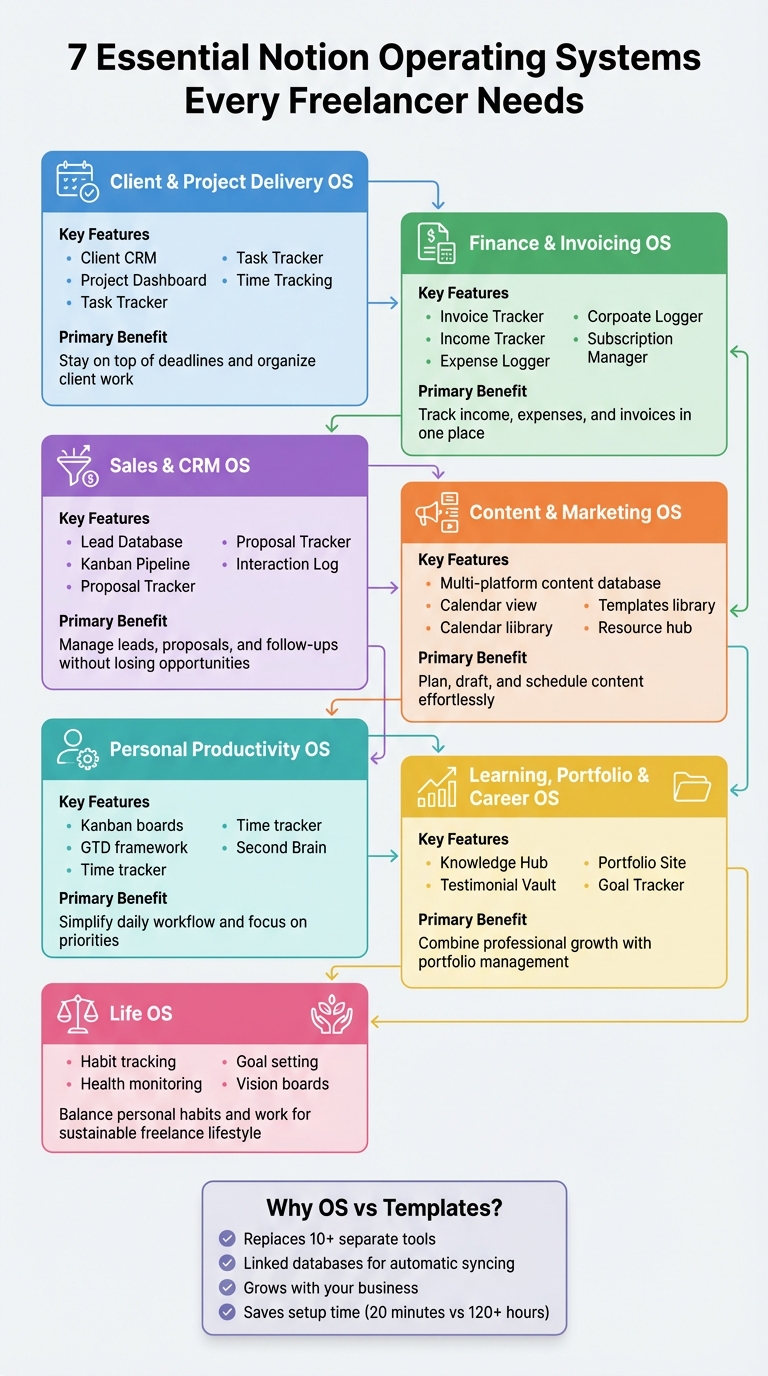
7 Essential Notion Operating Systems for Freelancers Overview
Freelance OS - The Only Notion System You Need to Run a Profitable Freelance Business
sbb-itb-ced67d6
Why Freelancers Need Notion Operating Systems (Not Just Templates)
A Notion operating system (OS) acts as a centralized workspace for managing every part of your freelance business - clients, projects, finances, tasks, and even content creation - all in one connected hub. Unlike single-purpose templates, a Notion OS uses linked databases to ensure your information flows seamlessly. For example, invoices can automatically connect to specific clients and projects, while meeting notes sync with task deadlines. This setup reduces the need for repetitive manual updates and minimizes the hassle of jumping between tools.
Freelancers often rely on a mix of apps like Trello, Pipedrive, Google Sheets, and Todoist. While each app might serve a purpose, switching between them can fragment your workflow and lead to unnecessary distractions. A well-designed Notion OS can replace more than 10 separate tools, bringing everything into one place. Without this kind of system, you could find yourself wasting time digging through emails for a missed follow-up, searching for a misplaced proposal, or forgetting an invoice deadline because your spreadsheets and task trackers aren't connected. A Notion OS solves these problems by automatically syncing your CRM, project tracker, and finance dashboard.
Another advantage is that a Notion OS grows with your business. While templates often feel rigid and limited in scope, a Notion OS is built to evolve. Whether you're adding new types of clients, expanding services, or managing more complex workflows, the system can adapt to your needs. The result? Less time spent on admin, fewer missed deadlines, and a clear, real-time overview of your business from leads to payments.
1. Client and Project Delivery OS
A Client and Project Delivery OS brings all aspects of client management, project tracking, and deadlines into one unified workspace. By connecting your client CRM directly to a project tracker and task dashboard, this system ensures that as soon as you add a new client, their projects and tasks automatically sync, keeping everything organized and deadlines in check.
Key features often include a Client CRM for managing leads, contact details, proposals, and contracts; a Project Dashboard with tools like Kanban boards and timeline views to monitor progress; and a Task Tracker to break projects into actionable steps with clear due dates. Some setups even offer time tracking and meeting notes. For example, the Freelance Business OS System and Small Business OS Template Kit are excellent options that combine these essential tools, helping you quickly identify which projects are progressing smoothly and which need attention.
A typical workflow might start with reviewing project timelines to spot overlapping deadlines. Then, use the Kanban board to move tasks from "In Progress" to "Review" as you complete deliverables. Got a new client request via email? Use the Quick Add feature to instantly link it to the relevant project. This approach keeps everything predictable and ensures no task or deadline slips through the cracks.
As your freelance business expands, this OS can grow with you. You can incorporate databases for team members, store Standard Operating Procedures (SOPs) in a Resource Hub, or even create client portals for sharing updates in a professional way. Tools like the Headquarters Toolkit and Rocket OS Team and CRM Workspace cater to freelancers transitioning from solo work to leading small teams, providing a shared space to manage tasks and responsibilities efficiently.
If you're looking for more options tailored to your workflow and client needs, check out the Business OS dashboards category for additional setups, including beginner-friendly starter templates, designed to streamline client and project management.
2. Finance and Invoicing OS
A Finance and Invoicing OS brings all your financial tracking - income, expenses, invoices, and recurring costs - into one organized Notion workspace. It’s the perfect upgrade from juggling spreadsheets, invoicing tools, and scattered notes. For freelancers who often forget to log expenses or follow up on overdue invoices, this setup transforms chaos into a streamlined financial hub.
Here’s what makes it powerful: an Invoice Tracker to monitor billing statuses (sent, paid, overdue), an Income Tracker to break earnings down by client or project, an Expense Logger to categorize business costs, and a Subscription Manager to avoid unexpected renewals on unused tools. Dashboards like Expense Tracker for Personal Finance, Finance Tracker with Monthly Summaries, and Personal Finance 101 come preloaded with these tools, often featuring visual reports that update automatically as you log transactions.
Imagine this workflow: at the start of the week, you check the "Overdue" section in your invoice tracker to follow up with late-paying clients. When wrapping up a project, you can use a Quick Add button to create an invoice instantly, linking it to the client’s profile in your CRM. At the end of the month, review your expense categories to see where your money went and adjust your spending for the next quarter. By connecting invoices to specific projects, you can calculate profit margins by subtracting labor costs and expenses, giving you a clear picture of which services are the most lucrative.
"I finally know which projects are actually profitable. The financial dashboard has completely changed how I price my services,"
says James Rodriguez of JR Web Development.
As your freelance business expands, this OS grows with you. You can add features like databases for tax deductions, track ad spend for projects, or set annual revenue goals with progress bars. Some systems even generate monthly and yearly visual reports automatically, saving you from tedious manual updates. This scalability makes it an indispensable part of your freelance toolkit. To explore more finance-focused setups, check out the Finance & CRM OS category and find a dashboard that fits your business needs.
3. Sales and CRM OS for Freelancers
A Sales and CRM OS is designed to simplify how freelancers manage leads, proposals, and follow-ups by keeping all client and prospect data in one place. Instead of juggling scattered details or missing key follow-ups, this system provides a clear view of every opportunity, organized by its stage in your sales pipeline. For freelancers balancing multiple inquiries with active projects, it ensures no opportunity slips through the cracks.
At the heart of this system is a Lead Database that tracks contact details, interaction history, and the current status of each prospect. Many setups include a Kanban-style pipeline that helps you visually manage leads through stages like Initial Contact, Proposal Sent, Negotiation, Won, or Lost. This structure makes it easy to identify which prospects need immediate attention. Additional tools, like a Proposal Tracker, link directly to leads by storing quotes, contracts, and NDAs in one place. An Interaction Log keeps meeting notes and follow-up tasks organized. Dashboards such as the Sales Pipeline CRM Dashboard come pre-configured with these features, often including a "Copy Archive" of email templates to speed up your outreach efforts.
Here’s how it works in practice: When a new inquiry comes in, you create a lead with their contact details and a brief summary. After a discovery call, you log notes and set a reminder to send a proposal. Once the proposal is sent, you move the lead to "Proposal Sent" in your pipeline. At the start of the week, you can filter for leads in the "Negotiation" stage to prioritize follow-ups. When a lead converts, the system can trigger a new project setup in your Client and Project Delivery OS. By connecting your CRM to a finance tracker, you can even analyze which lead sources or client types generate the most revenue. This streamlined approach grows with your business, making it adaptable as your workload increases.
"Agency OS saved my sanity. I went from 5 different apps to one Notion workspace. Clients actually comment on how professional our process is now."
- Sarah Chen, Owner of Chen Design Studio
Like the Client Delivery and Finance OS, the Sales & CRM OS focuses on optimizing a critical part of your freelance workflow while integrating seamlessly with other systems. As your business grows, you can expand its capabilities by adding features like a Client Portal for secure project updates, tracking conversion rates by lead source, or integrating performance metrics to evaluate your closing rate. Some systems have managed over $2M+ in revenue across hundreds of clients, showing how a well-organized CRM can support significant growth. To find pre-built sales and CRM solutions tailored to your needs, check out the Finance & CRM OS category and explore dashboards that match your workflow.
4. Content and Marketing OS
A Content and Marketing OS is specifically crafted to help freelancers streamline their content creation and publishing processes. By consolidating tasks like planning, drafting, and posting into a single hub, this system eliminates the hassle of juggling multiple platforms. It ensures consistent posting while making it simple to track what’s published, what’s in progress, and what’s queued up next. Plus, it works seamlessly alongside other dashboards like those for project management and finances.
At its core, a Content and Marketing OS centralizes all your content - blogs, newsletters, and social media posts - into one database. Using a multi-select property, each piece can be tagged by platform (e.g., LinkedIn, Twitter, or blog), while a "Status" property tracks progress through stages such as "Not started", "Draft", "Reviewed", "Scheduled", and "Published." Many setups also include a calendar view to visualize your publishing schedule. Pre-made templates for newsletters, blogs, and social posts speed up the creation process while helping maintain a consistent brand voice. Additionally, a resource library links directly to content tasks, making research and reference materials easily accessible.
Here’s how it works in practice: Got a new content idea? Add it to your backlog with a "Not started" status. During your weekly planning, move high-priority ideas to "Draft" and assign publish dates. As you work, you can reference linked resources from your library. Once a piece is reviewed and scheduled, update its status and add the live URL to a "Link to post" property for quick access when updating your portfolio and career playbooks. Dashboards like the Multi-Channel Content Planner, Blogging OS with AI and SEO, and Social Media Planning Kit come pre-configured with these workflows. In fact, over 10,000 users have relied on similar systems to maintain a consistent publishing schedule.
"This freelance Notion template is built to help you centralize everything in one place, so you can focus on delivering great work without the chaos",
says Quentin Villard, founder of Notion Everything.
Beyond keeping your content pipeline organized, a Content and Marketing OS can integrate with your portfolio and testimonials, ensuring your public-facing work always showcases your latest projects. If you’re looking for pre-built systems tailored to freelancers, check out the Marketing Content OS category to find dashboards that align with your workflow.
5. Personal Productivity OS
A Personal Productivity OS acts as your all-in-one hub for managing tasks, priorities, and focused work. Instead of hopping between tools like Todoist, Trello, or Google Sheets, everything is consolidated into a single workspace. This not only simplifies your workflow but also helps you stay focused on what truly matters by reducing mental clutter and providing a clear view of your workload [3,10].
The magic lies in its ability to centralize and streamline your daily management. With visual tools like Kanban boards, timelines, and status filters, you can easily track deadlines and manage task dependencies [3,6]. Many of these systems are built around time-tested frameworks like Getting Things Done (GTD) and P.A.R.A. (Projects, Areas, Resources, Archives), which make staying organized much simpler. Features like built-in time trackers help you identify inefficiencies, while a "Second Brain" captures ideas, articles, and resources, keeping your mind clear and focused [3,4].
Here’s how it works in practice: Start your day by reviewing your planner and time-blocking key tasks to keep burnout at bay. Use a comprehensive life productivity planner to store SOPs for recurring tasks, saving time and effort. At the end of the week, check your OKR tracker to align daily actions with your bigger goals, giving you a sense of progress and purpose.
"It significantly improved my efficiency and peace of mind by letting me spend less time switching between tools and focus more on delivering quality work",
says Quentin Villard, co-founder of Notion Everything.
For freelancers aiming to create their own Personal Productivity OS, OS Dashboard HQ offers a range of curated options. Popular choices include the GTD Productivity Dashboard, Bullet Journal Productivity System, Ivy Lee Six Tasks System, and Clarity Focus and Time Management OS.
6. Learning, Portfolio, and Career OS
A Learning, Portfolio, and Career OS acts as a central hub for professional growth - organizing skills, courses, case studies, and work samples in a premium Notion templates bundle. Instead of juggling certificates, testimonials, or course notes across multiple files, this system brings everything together in a Knowledge Hub. This approach transforms scattered resources into an organized, actionable library, saving you from wasting time hunting for key documents or insights.
What makes this OS stand out is how it connects learning with portfolio building. It includes a Portfolio Site tool, allowing you to showcase work samples and experience in a way that highlights the types of projects you want to attract, not just what you've done before. Add a Testimonial Vault to store client feedback and a Resource Library for SOPs and templates, and you’ve got a system that not only demonstrates your expertise but also reflects your structured, professional approach.
This OS integrates seamlessly into your daily workflow, ensuring professional growth becomes a part of your routine. Here’s an example of how it works: after completing a project, you can immediately log the case study and any client testimonial into your portfolio database. When you finish a course or come across an insightful article, you can capture the key takeaways in your Knowledge Hub. At the end of each quarter, use the Goal Tracker to review your progress and align your learning efforts with your career objectives. This rhythm ensures your development stays intentional and aligned with your long-term goals.
"The Knowledge Hub turns scattered resources into an actionable library - so you spend less time searching and more time growing,"
explains Productive Self.
For freelancers, integrating this OS into your workflow is a game-changer. OS Dashboard HQ offers systems designed to combine knowledge management with portfolio showcasing. For instance, the Freelance Business OS System includes modules for portfolio management and goal tracking. Meanwhile, the Business OS dashboards category provides templates with built-in SOP libraries and sections for client testimonials. By incorporating a Learning, Portfolio, and Career OS into your setup, you can connect every part of your business and growth strategy into one streamlined Notion dashboard designed for freelancers.
7. Life OS to Support Freelance Work
Freelancing often demands juggling multiple responsibilities - deadlines, proposals, invoices - and in the process, personal well-being can easily take a backseat. A Life OS steps in to balance the equation, managing habits, routines, and life admin so your personal life supports your professional ambitions. Acting as a "Second Brain", it keeps track of notes, tasks, and ideas, ensuring personal growth stays on your radar even when work gets hectic.
This system connects personal discipline to professional success. Modules for habit tracking, health monitoring, and goal setting help sustain the energy and focus needed to run a solo business. For example, tools like a Gym OS or Minimalist Habit Tracker can help you stay consistent with exercise, which directly impacts your productivity and mental clarity.
"Build your Second Brain in 20 minutes, and free your mind forever."
– Notion Everything
Kick off each day by setting intentions, reviewing goals, and tracking habits alongside your business milestones. Many freelancers also incorporate vision boards or journaling into their Life OS to stay aligned with their purpose, especially during challenging periods. This level of personal clarity strengthens your ability to focus on client work and long-term projects.
For freelancers looking to enhance their setup, OS Dashboard HQ offers a curated selection of Life OS dashboards tailored to various needs. The Life OS dashboards category includes options like the Life OS Dashboard for Everyday Systems, which organizes routines and personal admin, and the Life OS Habit Dashboard, designed to help you build and track habits effectively. For a more all-encompassing approach, the All-in-One Life Planner and Dream Life Planner combine wellness tracking with goal alignment and personal finance management. Adding a Life OS to your freelance toolkit ensures that both your work and well-being are aligned, creating a balanced and sustainable system for success.
How to Roll Out These 7 OS Dashboards Without Overwhelm
Trying to install all seven OS dashboards at once can easily throw your workflow into chaos. Building a full setup from scratch might take over 120 hours, but you can sidestep that by starting small. The trick is to focus on what your business needs most and phase in the rest later.
Phase 1 should always begin with your Client and Project Delivery OS. This system tackles the immediate issues of disorganized tasks, missed deadlines, and overlooked follow-ups. Start by centralizing your contact list (CRM) and tracking active deliverables. This step provides what one framework describes as "confidence, clarity, and control" over your current workload. Once this foundation is in place, it becomes much easier to add financial, sales, and productive CEO systems. Many professional templates come with onboarding guides, allowing you to set up the system in as little as 20 minutes. This means you can hit the ground running without needing to learn complicated terminology.
Phase 2 focuses on your Finance and Invoicing OS. After stabilizing project tracking, you can move on to managing income and expenses, replacing clunky spreadsheets. By linking invoices directly to your client database, you create a seamless flow of information. Phase 3 introduces your Sales and CRM OS, which helps you track leads and manage proposals once your delivery system is running smoothly. Finally, Phase 4 brings in Content, Productivity, Learning, and Life OS dashboards to support long-term goals and personal growth.
To avoid overwhelm, stick to the template’s default settings for the first few weeks. Resist the urge to over-customize until you’ve had time to understand how the system fits your workflow. For a faster rollout, consider bundles like the Premium Notion OS Bundle or the Lifetime Notion Templates Library. These bundles give you access to multiple OS dashboards, but you can still implement them one at a time.
This phased approach ensures quick wins - like better client management and more organized finances - before moving on to areas like marketing or habit tracking. As Quentin Villard, Co-founder of Notion Everything, explains:
"Spend less time switching between tools and focus more on delivering quality work".
Start with one OS, get comfortable with it, and then add the next. Once you’ve mastered your core system, you can explore more dashboards on OS Dashboard HQ to further refine your workflow.
Next Steps: Find Freelancer-Friendly OS Dashboards on OS Dashboard HQ
Discover pre-built Notion OS dashboards tailored to your workflow at OS Dashboard HQ. This curated directory organizes Notion operating systems by role and use case, making it easier for freelancers, solo creators, and small agencies to find their perfect setup. Here’s a quick guide to help you navigate the key categories.
For managing clients and projects, explore Business OS dashboards. Top picks include the Freelance Business OS System and Small Business OS Template Kit. Need something more advanced? Check out the Rocket OS Team and CRM Workspace or the Headquarters Toolkit for team collaboration and CRM features.
If finances and client relations are your focus, head to the Finance & CRM OS category. Options like the Sales Pipeline CRM Dashboard, Finance Tracker with Monthly Summaries, and Personal Finance 101 can help you stay organized.
Freelancers in marketing and content creation should check out the Marketing Content OS category. The Multi-Channel Content Planner is perfect for managing social posts, newsletters, and blogs, while the Blogging OS with AI and SEO caters to freelance writers. For social media growth, explore the Twitter Growth Mastery System or the Social Media Planning Kit.
For personal productivity and life management, browse the Personal Productivity OS category and Life OS dashboards category. Popular choices include the GTD Productivity Dashboard, Clarity Focus and Time Management OS, Life OS Dashboard for Everyday Systems, and All-in-One Life Planner. For simpler task management, consider the Ivy Lee Six Tasks System or the Bullet Journal Productivity System.
If you’re interested in multiple systems, check out bundles like the Premium Notion OS Bundle, Lifetime Notion Templates Library, or Productivity Templates Bundle. These bundles offer several systems at a discounted rate, but it’s wise to implement them one at a time to avoid feeling overwhelmed. Don’t forget to bookmark OS Dashboard HQ so you can stay updated as your needs evolve.
Wrapping Up
Running a freelance business doesn’t have to mean juggling a mess of tools or scrambling to keep up with deadlines, invoices, and ideas. The seven Notion operating systems in this guide can transform your workflow into a single, organized command center. With everything in one place, you’ll stay on top of your work and maintain focus.
These systems go beyond just organizing your tools - they bring clarity, efficiency, and a polished client experience. Freelancers who use them often see benefits like automated profit tracking, streamlined invoicing, and workflows that save time. On top of that, clients notice the improved professionalism, which can make a lasting impression. By simplifying your process, these dashboards lay the groundwork for long-term freelance success.
If you’re just starting out, don’t feel pressured to adopt all seven systems at once. Pick one or two key dashboards - like a Client CRM or Project Delivery system - and expand as you grow more comfortable. Many templates include step-by-step setup guides, so you can get started in under 20 minutes. Plus, Notion’s flexibility allows you to tweak everything to fit your industry or style.
Whether you’re a designer, writer, developer, or consultant, these scalable systems can help you stay organized, strengthen client relationships, and grow your business without the overwhelm. Ready to take your freelance workflow to the next level? Check out OS Dashboard HQ to find dashboards tailored to your needs. Don’t forget to bookmark the site so you can revisit it as your business evolves. Build a freelance setup that works for you.
FAQs
What makes a Notion OS different from a template?
A Notion OS goes beyond a simple template. It’s an interconnected system designed to manage various aspects of your freelance business or personal life in one place. While a template might focus on a single task - like tracking projects or managing invoices - a Notion OS combines multiple workflows, automations, and scalability into a centralized dashboard.
This setup helps freelancers stay organized, maintain consistency, and work more efficiently, especially as their needs evolve and grow.
Which Notion OS should I set up first as a freelancer?
Start with a Notion OS that brings together projects, clients, and finances into one cohesive workspace. This kind of setup simplifies your workflow, cutting down on scattered information and making it easier to stay on top of your essential freelance tasks. By keeping everything in one place, you can focus more on delivering great work and less on managing chaos.
How do I connect clients, projects, and invoices in Notion?
An all-in-one freelance OS template in Notion can bring order to the chaos of juggling clients, projects, and invoices. These templates are designed with a central dashboard that ties everything together, offering sections for client details, project tracking, and invoice management.
By linking these databases, you gain a clear view of your freelance operations. You can easily manage client relationships, stay on top of project deadlines, and keep track of payments - all from one streamlined workspace. Plus, with the ability to tailor the template to your specific needs, you can build a system that works seamlessly with your workflow.